Introduction
Picture this: you're sourcing for a senior JavaScript developer, and your search returns a thin pool of candidates. The problem isn't that qualified people don't exist — it's that half of them wrote "JS" on their profiles, another group listed "Node.js" as their primary skill, and a few just described themselves as "full-stack engineers." Your keyword search missed all of them.
This kind of mismatch is expensive. According to a Harvard Business School study, 88% of employers acknowledge their automated hiring systems filter out qualified candidates because profiles don't match rigid keyword criteria. And with recruiters spending 13+ hours per week on sourcing alone, a poorly structured search compounds the problem fast.
Boolean search gives you logical control over how databases interpret your queries. A well-built Boolean string surfaces candidates a plain keyword search would never find. A careless one silently excludes half the people you're actually looking for.
This guide covers:
- Core Boolean operators and how they work
- Building effective search strings step by step
- Platform-specific differences to know
- Common mistakes that shrink your candidate pool
- When AI-powered sourcing picks up where Boolean leaves off
TL;DR
- Boolean search combines logical operators (AND, OR, NOT) with modifiers like quotes, parentheses, and wildcards to control exactly which profiles a database returns.
- AND narrows, OR expands, NOT excludes — all three work together in a well-structured string.
- Building an effective string is iterative: start with must-haves, layer in synonyms with OR, add exclusions, then refine based on results.
- Syntax rules differ by platform — LinkedIn doesn't support wildcards; Google's
site:andfiletype:operators only work in Google. - AI-powered sourcing handles terminology variation and skill inference automatically — a practical complement when Boolean's keyword dependency limits your reach.
Core Boolean Operators Every Recruiter Should Know
AND, OR, and NOT are the three operators that control everything. Each one does a distinct job, and you need all three working together for a string that actually performs.
AND — Narrow Your Search
AND requires every connected term to appear in a result. It's the precision operator, best used for non-negotiable requirements: certifications, must-have technologies, or specific domain experience.
Example: project manager AND PMP AND construction
This returns only profiles containing all three terms simultaneously. Someone with PMP certification in healthcare won't appear, and neither will a construction supervisor without the PMP. That's intentional: AND is for criteria that are genuinely non-negotiable. Chain too many AND conditions together, though, and you'll engineer yourself into a near-zero result pool.
OR — Expand Your Search
OR returns candidates who mention at least one of the listed terms. It's the synonyms operator — essential for capturing how different people describe the same role or skill.
Example: "UX Designer" OR "Product Designer" OR "UI/UX Specialist"
Without these variations, you miss every qualified candidate who used a different label for the same job. Title inconsistency is common across industries: what a startup calls a "Product Designer," a large enterprise calls a "UX Lead." OR is what keeps your search from being limited to a single naming convention.
NOT — Exclude Irrelevant Results
NOT removes profiles containing a specific term. Use it to filter seniority mismatches, irrelevant industries, or job posting noise.
Example: "Software Engineer" NOT (Manager OR Lead OR Director)
One important note: Google prefers the minus sign (-) rather than the word NOT. On most ATS platforms and LinkedIn, NOT (uppercase) is the correct syntax.
Be careful with NOT. Exclude too broadly and you'll accidentally remove people you want — a "Lead Developer" who doesn't manage anyone, or a "Senior Manager" at an individual contributor level.
Modifiers: Quotes, Parentheses, and Wildcards
Three modifiers extend what the core operators can do:
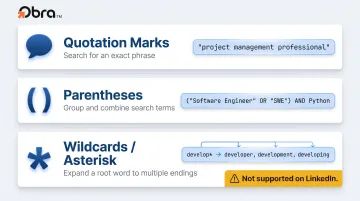
- Quotation marks force exact phrase matching. Use them for multi-word titles and certifications:
"project management professional"returns that exact phrase, not separate matches for each word. - Parentheses group OR terms together and control the order of operations. Without them, AND is processed before OR — which silently changes your query's intent. Always wrap OR groups:
("Software Engineer" OR "SWE" OR "Software Developer") AND Python. - Wildcards (asterisk) capture word-ending variations.
develop*returns developer, development, developing. Useful on many ATS platforms and Google — but LinkedIn does not support wildcards natively, per LinkedIn's official documentation.
How to Build an Effective Boolean Search String
Most poor Boolean results aren't a Boolean problem — they're a construction problem. Unclear must-haves, missing synonyms, and syntax errors are responsible for the majority of underperforming searches.
Step 1 — List Must-Have Keywords
Start with the non-negotiables: the skills, certifications, or qualifications that every candidate must have. These become your AND anchors. Without a clear foundation, everything downstream produces an unworkable pool.
For a senior full-stack developer role, that might be: Python AND (React OR Vue) AND AWS
Step 2 — Add Title Variants and Synonyms with OR
Group equivalent job titles and skill synonyms in parentheses:
("Software Engineer" OR "Software Developer" OR "SWE" OR "Full Stack Developer")
Candidates describing the same experience use different language depending on their industry, company size, and era. Capturing those variations is the single highest-impact improvement you can make to most strings.
Step 3 — Include Credential and Seniority Variations
Add certification abbreviations and full-name variations:
(PMP OR "Project Management Professional")
Candidates abbreviate credentials inconsistently. Running both versions significantly improves coverage with no downside.
Step 4 — Use Exclusions to Remove Noise
Apply NOT strategically to filter out seniority mismatches and job posting noise:
NOT (intern OR internship OR Director OR VP) -jobs -hiring -"apply now"
This step cuts the back-end review time that goes into dismissing results you never wanted in the first place.
Step 5 — Test, Review, and Refine Iteratively
Once the string is built, run it and examine the first page of results critically — this is where construction problems surface fastest:
- Too few results? Remove an AND condition or add more OR synonyms.
- Wrong seniority? Add NOT exclusions.
- Job postings showing up? Add
-jobs -hiringexclusions. - Right titles but wrong industry? Layer in an AND condition for a relevant domain term.
Here's what that progression looks like for a senior full-stack developer:
| Version | String | Issue |
|---|---|---|
| Basic | software engineer AND Python AND React |
Misses "SWE," "developer," and "full stack" variants |
| Improved | ("Software Engineer" OR "SWE" OR "Full Stack Developer") AND Python AND React |
Better coverage, but still shows junior profiles |
| Refined | ("Software Engineer" OR "SWE" OR "Full Stack Developer") AND Python AND (React OR Vue) AND AWS NOT (intern OR junior OR Director) |
Targeted pool, right seniority, relevant tech |
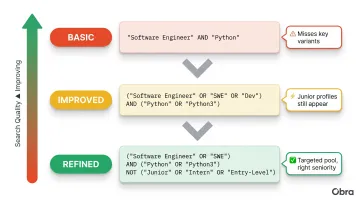
Most recruiters reach a usable string by the third iteration. The table above shows exactly why — each refinement closes a specific gap rather than starting over.
Advanced Boolean Techniques and Platform Differences
Advanced operators extend Boolean search beyond internal databases into open-web sourcing, though support varies significantly by platform.
Platform-Specific Syntax Notes
| Platform | AND/OR/NOT | Quotes | Parentheses | Wildcards | Google Operators |
|---|---|---|---|---|---|
| LinkedIn Recruiter | ✅ (uppercase) | ✅ | ✅ | ❌ | ❌ |
| ✅ | ✅ | ✅ | ✅ | ✅ (site:, filetype:) | |
| Greenhouse ATS | ✅ | ✅ (straight quotes only) | ✅ | Varies | ❌ |
| Other ATS platforms | Varies by vendor | Varies | Varies | Varies | ❌ |
A few practical notes:
- LinkedIn processes Boolean in this order: quotes first, then parentheses, then NOT, AND, OR last. Misunderstanding this order is one of the most common sources of silent search errors.
- Greenhouse warns against copying strings from Microsoft Word — "smart quotes" (curly quotation marks) silently break Boolean queries without returning an error.
- The
+and-operators are not officially supported on LinkedIn. Use AND and NOT instead.
X-Ray Sourcing on Google
When platform search walls, paywalls, or weak native search tools limit what you can find, X-ray sourcing fills the gap. It uses Google to surface public profiles and resumes from LinkedIn, GitHub, university portals, and personal sites — content those platforms have indexed publicly but don't always surface well through their own search.
Three operators drive X-ray sourcing:
site:restricts results to a specific domain:site:linkedin.com/in "Product Manager" AND "fintech"filetype:surfaces specific document formats:filetype:pdf "data scientist" AND "machine learning"-(minus sign exclusions) clean up noise:site:linkedin.com/in "UX Designer" -jobs -directory
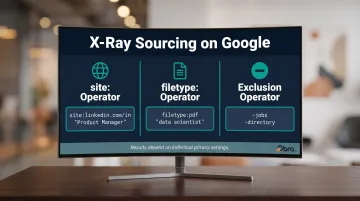
Google's official search operators documentation confirms site: and filetype: are fully supported. Results depend on individual privacy settings — not every LinkedIn profile is publicly indexed, so X-ray works best as a supplementary approach rather than a primary sourcing channel.
Common Mistakes Recruiters Make with Boolean Search
Most Boolean failures trace back to a handful of predictable errors, not flaws in the technique itself.
Mistake 1: Over-restricting with too many AND conditions
Chaining five or six AND requirements together creates a string so narrow it returns nothing useful. Start broad and tighten incrementally. The right string comes from iteration, not from building it perfectly on the first try.
Mistake 2: Ignoring title and terminology variations
A "Growth Marketer" at a Series A company is functionally equivalent to a "Digital Marketing Manager" at a Fortune 500 — yet a string targeting only one title misses the other entirely. This gap is especially costly when sourcing roles that vary by company size or industry.
Mistake 3: Syntax errors that silently break the string
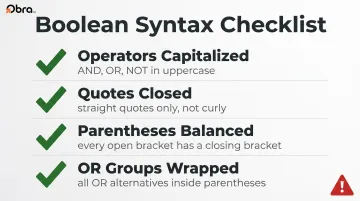
Unclosed quotes, missing parentheses around OR groups, or using lowercase operators on platforms requiring uppercase will return completely unintended results with no error message. Before running any string, run through this quick checklist:
- ✅ AND, OR, NOT are capitalized
- ✅ All quotation marks are closed (and are straight quotes, not curly)
- ✅ All parentheses are opened and closed
- ✅ All OR groups are wrapped in parentheses
When to Use Boolean Search — and When to Go Beyond It
Boolean is the right tool in specific situations:
- Niche or technical roles where terminology is consistent and well-defined
- ATS/CRM rediscovery — finding past candidates who weren't ready when you last spoke
- X-ray sourcing on Google for passive candidates with specific credentials
- Situations where the recruiter has a very clear profile and knows exactly how candidates describe themselves
The limitation is real, though. Boolean cannot infer related skills, career progressions, or contextual intent. A search for "machine learning engineer" won't surface a strong candidate who describes themselves primarily as working on "deep learning" or "MLOps" — unless those terms are explicitly added to the string. According to LinkedIn's 2025 Future of Recruiting Report, 93% of talent acquisition professionals believe accurately assessing skills is crucial for quality of hire — which points to the structural gap keyword-only approaches leave open.
Title-based sourcing compounds this problem: job titles vary widely across industries, company sizes, and geographies, meaning many qualified candidates simply won't match the terms you're searching for.
AI-powered sourcing addresses this directly. Platforms like Obra Hire go beyond keyword matching — searching across 800M+ verified candidate profiles using competency-based matching rather than text search. Instead of requiring a recruiter to enumerate every synonym and variation, the system evaluates structured competency data against a role's requirements, then surfaces ranked matches based on actual skill alignment.
Recruiters can describe their ideal candidate in natural language or paste a job description directly, and the platform returns results sorted by fit — including candidates whose profiles use entirely different terminology than the search query.
One practical advantage: Obra Hire's Candidate Pool Preview lets recruiters see pool size and profile quality before spending any credits, so they can validate search criteria before committing. It pairs naturally with Boolean work — use Boolean for precision sourcing within your ATS, and AI-powered outbound search when you need broader coverage or are sourcing roles where candidate terminology is unpredictable.
Frequently Asked Questions
What does Boolean mean in recruiting?
Boolean search in recruiting is a method of combining keywords with logical operators (AND, OR, NOT) to precisely control which candidate profiles a database returns. Named after mathematician George Boole, the method applies binary true/false logic — the same principle search engines use to include or exclude results.
What are some Boolean search examples?
Two practical examples:
- Technical role:
("Software Engineer" OR "SWE") AND Python AND AWS NOT intern - Non-technical role:
("Account Executive" OR "Sales Representative") AND SaaS AND "B2B" NOT Director
Each string uses OR to group title variants, AND for must-haves, and NOT to filter out unwanted results.
Do Boolean operators work the same on all recruiting platforms?
Core operators (AND, OR, NOT) work across most platforms, but advanced modifiers vary. LinkedIn does not support wildcards, and Google-specific operators like site: only function in Google searches. Always use straight quotes — formatted quotes from Word silently break queries.
What is X-ray sourcing in Boolean search?
X-ray sourcing uses Google's site: operator to search the publicly indexed content of specific websites — like LinkedIn or GitHub — for candidate profiles. It bypasses limitations of those platforms' internal search tools, giving recruiters access to profiles that may not surface through standard sourcing methods.
When should recruiters use Boolean search vs. AI-powered search?
Boolean works best for precise, well-defined roles with consistent terminology. AI-powered search handles broader sourcing, roles with varied terminology, or situations where speed and scale matter. Use Boolean for targeted ATS searches; switch to AI-powered platforms like Obra Hire when keyword dependency limits your reach during outbound sourcing.