The result is predictable — wasted screening time, slower fills, and misaligned shortlists. According to SHRM's 2025 Recruiting Benchmarking Report, the median time-to-fill for non-executive roles has climbed to 44 days, up from 30 days in 2022. Poor candidate targeting is a significant contributor to that gap.
This guide walks through exactly how to build distinct, role-specific candidate profiles for multiple open positions — what to prepare, a step-by-step process, the key elements that make profiles effective, and the mistakes that quietly kill results.
TL;DR
- Build a separate candidate profile for every open role — never reuse one generic search across unlike positions
- Define skills (with proficiency levels), seniority range, and industry context before building any profile
- Profiles built on competency frameworks surface better candidates than those relying on job titles or keywords alone
- Preview your candidate pool size before activating outreach to catch over- or under-filtering early
- Avoid copy-pasting profiles across similar-sounding roles or stacking too many filters at once
Why You Need a Separate Candidate Profile for Each Job Role
The instinct to reuse a search makes sense on the surface — especially when roles share a title. But shared profiles create shared problems.
Two "Marketing Manager" openings can have almost nothing in common. One requires B2B demand generation experience with Salesforce and Marketo proficiency. The other is a brand-focused role with an emphasis on content strategy and agency management. A single profile built to cover both will return candidates who are a mediocre fit for each — or a strong fit for neither.
Role-specific profiles solve this by giving each position its own targeted pipeline:
- Defines skills, seniority range, and industry context independently for each role
- Keeps outreach relevant — a DevOps engineer and a finance analyst need different messaging
- Prevents candidates sourced for one role from surfacing in another role's pipeline
The data makes the stakes clear. Over 70% of recruiters report that fewer than half of their applicants actually meet role requirements. That's an inbound problem — and generic outbound searches using a single catch-all profile reproduce it, except you've spent time and credits to get there.
What to Gather Before Building Your Candidate Profiles
The quality of a candidate profile depends entirely on the quality of inputs. Vague inputs produce vague searches. Skipping the preparation phase is the single fastest way to build profiles that return low-value results.
Job Requirements and Stakeholder Input
Before configuring any search, align with the hiring manager on must-have versus nice-to-have qualifications. This distinction matters more than most recruiters acknowledge.
What's written in a job description and what's actually required to succeed in the role frequently diverge. Research from the Burning Glass Institute found that for every 100 jobs where companies removed degree requirements, only 3.7 additional non-degree holders were actually hired, showing that written requirements often fail to reflect real hiring behavior. That gap is exactly why pre-search alignment matters. Expert recruiter John Vlastelica, formerly of Amazon and Expedia, calls misalignment "the root of all evil in recruiting" and describes this conversation as the most critical pre-sourcing activity in recruiting. The key outputs from this conversation:
- Which qualifications are genuinely non-negotiable
- Which qualifications are preferred but negotiable
- What success actually looks like in the role after 90 days
Skills, Seniority, and Context Clarity
Every role needs three things confirmed before profiling begins:
- Specific skills required — technical and soft, with proficiency levels where relevant (e.g., intermediate SQL vs. advanced SQL)
- Acceptable seniority range — not just years of experience, but the level of autonomy and scope expected
- Industry or domain context — what background would make a candidate a strong fit vs. someone who'll need too long a ramp
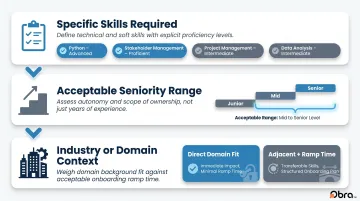
Without these three inputs confirmed upfront, searches return candidates who clear the resume screen but stall in the first conversation — wasting contact credits and interview time on the wrong pool.
How to Create Multiple Candidate Profiles for Different Jobs
The process is repeatable. Once you build the first profile correctly, customizing it for each additional role takes significantly less time — each step below applies to every role you add.
Step 1: Isolate Each Role Before You Begin
Treat each role as a standalone profiling exercise before touching any search settings. For each position, document:
- Job title and department
- Reporting structure (who does this person report to and who reports to them)
- Key deliverables for the first 90 days
- The core problem this hire solves
This foundation keeps your profiles distinct. Two profiles built on vague role definitions will drift toward each other — and that's when crossover starts.
Step 2: Define the Competency and Skills Criteria Per Role
Translate job requirements into a concrete skills list. Separate hard skills (technical, certifiable) from soft skills (communication, leadership), and assign priority to each.
Hard skills — these belong in your must-have criteria. Be specific:
- "Python" is less useful than "Python with data pipeline experience"
- "Project management" is weaker than "PMP-certified with cross-functional team management"
Soft skills — these often work better as ranking factors than as gatekeeping criteria.
Platforms like Obra Hire use competency-based taxonomy matching rather than keyword scanning. Each search result shows exactly where a candidate matches or falls short against your defined criteria — a direct contrast to filtering by resume text alone.
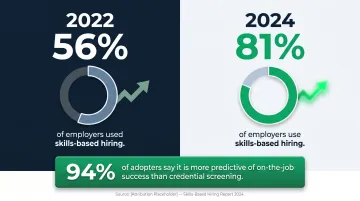
Skills-based hiring is now used by 81% of employers, up from 56% in 2022, and 94% of adopters say it is more predictive of on-the-job success than traditional credential screening.
Step 3: Set Experience, Seniority, and Industry Parameters
Configure these independently for each role — even when two roles share a title.
- Years of experience: Set a realistic range, not an aspirational one. A 2–6 year range is actionable; a 3–12 year range is not.
- Industry or domain tenure: A healthcare operations manager and a manufacturing operations manager may both have 8 years of experience, but their backgrounds are functionally different.
- Seniority signals: Past employer type, team size managed, and accountability scope often separate a genuine senior candidate from someone who holds the title without the depth
Step 4: Apply Location, Availability, and Compensation Filters
Set these at the profile level for each role — not later in the screening process.
- Location: Configure geographic requirements (on-site, hybrid, remote) specific to that role. An on-site finance role in Chicago shouldn't share location logic with a fully remote engineering role.
- Compensation: If salary data is available, use it to focus your pool — it eliminates candidates who will decline based on mismatch.
- Availability signals: Prioritize candidates whose profiles suggest openness to new opportunities.
Applying these filters upfront prevents wasted outreach on candidates who disqualify on logistics alone.
Step 5: Name, Save, and Organize Each Profile Distinctly
Use a consistent naming convention so profiles are immediately retrievable:
Format: [Role Title] – [Seniority] – [Location] – [Date]
Examples:
Senior DevOps Engineer – Remote – US – Jun 2025Operations Manager – Mid-Level – Chicago – Jun 2025Marketing Manager – Senior – NYC – Jun 2025
On platforms like Obra Hire, profiles can be organized into shared projects by role, with team members assigned as collaborators. This means the entire hiring team works from the same sourced pool — no duplicate searches, no fragmented pipelines.
Step 6: Preview the Candidate Pool Before Activating Outreach
Before sending a single message, validate your search against the actual candidate database.
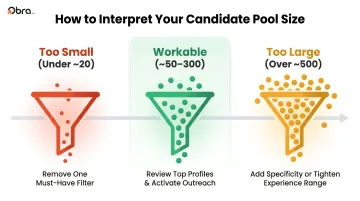
Obra Hire's pool preview feature lets recruiters see their estimated candidate count and review individual profiles before spending any contact credits. The system's feedback is direct — a pool of 151 candidates is workable; a pool of 8 signals over-filtering; a pool of 4,000 signals that your criteria aren't specific enough.
How to interpret pool size:
- Too small (under ~20): Remove one must-have filter at a time until the pool reaches an actionable range
- Too large (over ~500): Add a more specific skill, tighten the experience range, or promote a nice-to-have into the must-have column
- Workable (~50–300): Confirm the pool and review top profiles before activating outreach
Key Elements That Define a Strong Role-Specific Candidate Profile
A candidate profile that returns high-quality results every time is built on four specific dimensions — and most teams only get one or two of them right.
Skills and Competency Depth
Job title matching alone is not a sourcing strategy. Two candidates with identical titles can have completely different skills. Profiles that define skills with proficiency levels — intermediate SQL versus advanced SQL, for example — return far more relevant results than those relying on title or keyword matching.
The must-have vs. nice-to-have structure matters here. Must-haves control who enters your pool. Nice-to-haves rank the candidates within it. If everything is a must-have, your pool shrinks to an unworkable size.
Experience and Tenure Signals
Years of experience ranges should be functional, not symbolic:
- Too wide (1–15 years): Effectively no filter
- Too narrow (5–6 years): Eliminates qualified candidates with slightly different timelines
- Useful (3–8 years, within a relevant industry): Specific enough to filter, flexible enough to find candidates
Industry tenure and past employer type add meaningful signal without adding rigid gatekeeping. A candidate with 4 years at a Series B SaaS company often brings more relevant context for a scaling startup than someone with 7 years at a Fortune 500.
Verified Profile Integrity
Gartner projects that by 2028, 1 in 4 candidate profiles will be fake, and 41% of staffing buyers are already dealing with candidate fraud. Multiple tech CEOs have reported AI-assisted impersonation during live interviews firsthand.
Obra Hire's verified profile filtering surfaces authenticated candidates specifically to address this problem — reducing exposure to AI-generated profiles before outreach begins. This filter belongs on every profile, not just high-volume ones.
Location and Work Modality Alignment
Every profile should explicitly encode its location requirements:
- On-site (city + radius)
- Hybrid (city + proximity requirements)
- Remote (geographic eligibility, if any)
Outreach to a candidate in Miami for an on-site role in Seattle wastes their time and yours. Set location at the profile level and it never surfaces as a surprise during offer conversations.
Common Mistakes When Creating Multiple Candidate Profiles
Copying and Pasting Profiles Across Unlike Roles
Reusing the same profile for roles with overlapping titles but different functions produces surface-level matches. An easy audit: pull up any two profiles side by side and review the skills and experience criteria. If they look nearly identical for roles with different functions, one or both profiles needs to be rebuilt from the stakeholder input stage.
Over-Filtering to the Point of an Empty Pool
Stacking too many simultaneous constraints — highly specific skills + narrow location + tight experience band + industry requirement — can shrink the viable pool below actionable levels. Work through it one filter at a time:
- Identify which filter is most restrictive
- Remove or loosen it by one degree
- Check the pool size
- Repeat until the pool is workable
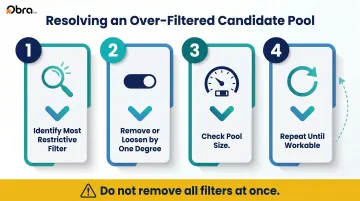
Removing all filters at once will cost you the precision you built — work through them incrementally instead.
Neglecting to Update Profiles as Role Requirements Evolve
A profile built at the start of a hiring cycle can become outdated within weeks. Stakeholders change their minds, scope shifts, and budget adjustments can affect the seniority level that's actually fillable.
Revisit each profile when:
- The hiring manager changes a requirement after seeing initial candidates
- The role's reporting structure or deliverables shift
- The search has been running for 3+ weeks with consistently poor results
Frequently Asked Questions
Can you have two profiles on Indeed?
Indeed's terms of service prohibit multiple accounts per user — creating duplicate accounts can result in content removal or account disabling. However, job seekers can maintain multiple resumes within a single account and tailor their application materials per role. The key distinction is between multiple accounts (not permitted) and multiple tailored applications (permitted).
What are some red flags in a candidate profile?
Common red flags include:
- Unexplained employment gaps or vague, inconsistent job titles
- Skills listed without demonstrated context or real application
- Signs of AI-generated content — overly generic summaries, implausibly broad skill sets
- Missing or unverifiable contact information and work history
How many candidate profiles should a recruiter maintain for different jobs?
Each active job requisition should have its own profile — there's no fixed ceiling. The practical limit is organizational: profiles that aren't clearly named and regularly audited start to overlap, which defeats their purpose. Most teams with solid naming conventions can manage 10–20 active profiles without confusion.
What's the difference between a candidate profile and a job description?
A job description outlines what the role involves from the company's perspective — responsibilities, requirements, and compensation. A candidate profile defines what the ideal person looks like for sourcing purposes — their skills, experience depth, background, and fit signals.
Should candidate profiles be updated as hiring needs change?
Yes. Review profiles any time the hiring manager revises requirements, the role's scope changes, or the search consistently returns poor-fit candidates. An outdated profile is one of the most common causes of misaligned shortlists.
Can the same candidate profile be reused for similar roles at different seniority levels?
No. Even when the title is the same, different seniority levels require separate profiles with adjusted experience ranges, skill proficiency levels, and scope expectations. Reusing the same profile across seniority bands systematically produces candidates who are over- or under-qualified — neither outcome is useful.