That's the real talent pool. And according to LinkedIn Talent Solutions, 87% of all workers — active and passive alike — are open to new opportunities. They just won't come to you.
The friction is real. Passive candidates don't have resumes ready. They don't browse job boards. Traditional ATS-driven workflows were built for inbound applications, not outbound relationship-building. Manual sourcing — Boolean searches, cold email blasts — doesn't scale when you're filling a specialized role under pressure.
This guide walks through exactly how AI recruitment tools change that equation: what you need before you start, a step-by-step sourcing workflow, and what to look for when choosing a tool.
TL;DR
- 70% of the workforce is passive — they won't apply to your postings, but most are open to the right conversation
- Define your ideal candidate by competency and skill criteria before running any AI search — job title alone produces bloated, irrelevant results
- Workflow in brief: define criteria → AI search → preview pool → personalize outreach → convert
- Passive candidate outreach requires brief, personalized messages framed around their career goals — not your job description
- Look for tools with competency-based matching, verified profile filtering, and direct ATS integration
Why Use AI Tools to Source Passive Candidates?
Sourcing is already the most time-intensive part of recruiting. Research from HootRecruit puts it at 13+ hours per week per recruiter — and that's before you factor in the low conversion rates of manual methods like LinkedIn Boolean searches and cold email blasts.
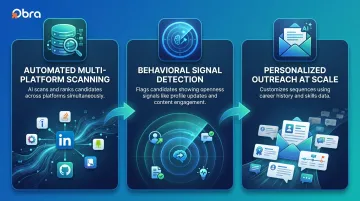
AI changes the workflow in three specific ways:
- Automated multi-platform scanning — AI tools search large candidate databases simultaneously and rank results by relevance, replacing manual one-platform-at-a-time searches
- Behavioral signal detection — platforms analyze profile updates, new connections, and content engagement to flag candidates who may be open to a conversation despite their "employed" status
- Personalized outreach at scale — AI can customize messages using candidate-specific data (career history, skills, past employers) across hundreds of outreach sequences simultaneously
Those three capabilities are only as useful as the roles you apply them to. AI passive sourcing delivers the most value when:
- You're filling specialized, mid-to-senior, or hard-to-fill roles where active applicant pools are thin
- Time-to-fill pressure is high but your team is small
- You're building a bench for recurring role types rather than reacting to each opening
For teams filling high-volume, entry-level roles with consistent active applicant flow, passive sourcing is less necessary. But for anyone trying to hire competitive talent who isn't job hunting — AI sourcing tools give you a direct line to candidates who will never see your job posting.
What You Need Before You Start
Three prerequisites. Each one matters for a specific reason:
- A defined ideal candidate profile (ICP) — without clear competency, skill, and seniority parameters, AI searches return bloated, irrelevant results; broad criteria waste credits and time
- An AI sourcing platform with multi-platform search and ATS integration — tools that can't push candidates into your existing workflow create manual handoff friction that eliminates the efficiency gains you're buying
- Outreach templates written before you start — AI can personalize and schedule message sends, but the initial contact, follow-up, and final touch messages need to be written by a human first
One expectation to set clearly: passive candidate outreach will always yield lower response rates than active candidate recruiting. Recruiter outreach response rates dropped to approximately 11% in 2026, down from 23% in 2023. Time-to-hire for passive sourcing runs 8–12 weeks, versus 5–7 weeks for active candidates.
The tradeoff is deliberate. Passive candidates are harder to reach precisely because they're not actively looking — which also means they tend to be more tenured and higher performing than the average inbound applicant pool.
How to Use AI Recruitment Tools to Source Passive Candidates: Step by Step
The sequence matters. Skipping the early steps — particularly candidate profile definition and pool preview — consistently produces irrelevant matches and wasted outreach spend.
Step 1: Define Your Ideal Candidate Profile
Translate your role requirements into a layered criteria set:
- Required skills and proficiency levels
- Preferred industry background
- Seniority range and years of experience
- Company type or size context (if relevant)
- Dealbreaker exclusions
Don't rely on job title alone. Passive candidates often carry directly relevant experience under a different title than you'd expect. A "Growth Marketing Manager" at a startup may do the same work as a "Demand Generation Lead" at an enterprise company.
Keyword search misses candidates whose profiles don't use your exact terminology. Competency-based matching identifies transferable skills and experience patterns instead — surfacing more qualified passive candidates, especially in niche or cross-functional roles.
Step 2: Set Up and Run Your AI Search
Input your criteria into the search interface. In a platform like Obra Hire, this includes filters for location, skills, years of experience, industry, and specific company tenure. The interface supports both natural language input and structured filters, so you don't need to know Boolean syntax to get precise results.
Use the platform's "Must Have" vs. "Nice to Have" distinction strategically. Must-Haves control which candidates enter the pool at all; Nice-to-Haves sort and rank the results. Getting this balance right keeps your pool from being either too restrictive or too broad.
Run the search and let the AI rank results by relevance. At this stage, prioritize coverage over precision — you'll filter in the next step.
Step 3: Preview and Filter Your Candidate Pool
Before spending any credits, review the candidate pool to validate quality. Look for:
- Profile completeness and consistent work history
- Skill alignment with your Must-Have criteria
- Tenure fit — very recent job starts (under six months) are typically low-conversion targets
- Seniority match
Obra Hire's pool preview feature shows the estimated pool size and individual profiles — including years of experience, work history, education, and competency matches — before any credits are consumed. You only spend credits when you reveal a candidate's contact information (email, phone, LinkedIn). This lets you validate your search criteria thoroughly before making any financial commitment.
Apply verified profile filters where available. Gartner predicts that by 2028, 1 in 4 candidate profiles worldwide could be fake — driven by AI-generated resumes and deepfake interview technology. Filtering these out before outreach saves significant time and protects your team from chasing dead-end contacts.
Step 4: Initiate Personalized Outreach
Generic outreach to passive candidates fails because it signals immediately that you didn't think about them specifically. Use the profile data the AI surfaced to customize your message:
- Reference something specific to their career trajectory
- Frame the role as a natural next step for them, not just a vacancy you need filled
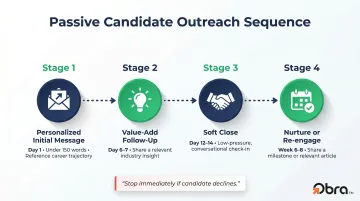
- Keep the message under 150 words
- Make the ask as small as possible: "15-minute call to explore fit" converts far better than asking for a full application
Set up a multi-touch sequence: an initial personalized message, a follow-up that adds value (a relevant industry insight, not just a repeated ask), and a final soft close that leaves the door open without pressure.
Send at times aligned with your candidates' local work hours rather than bulk-sending at a single time.
Step 5: Track Engagement and Nurture Your Pipeline
Monitor which message variations and candidate segments are generating responses. A/B test subject lines and opening hooks systematically — not just once.
For candidates who express interest but aren't ready to move, shift them into a nurture workflow:
- Congratulate a career milestone (promotion, new role anniversary)
- Share a relevant industry article or report
- Check in lightly every 6–8 weeks
Most passive candidates convert months after first contact. Staying present — without pressure — is what keeps you top of mind when they're ready.
What to Look for in an AI Passive Candidate Sourcing Tool
Passive candidate sourcing demands more from a tool than standard job board search. Three capabilities determine whether a platform actually delivers qualified candidates — or just burns your time and budget:
1. Competency-based matching The tool should identify candidates by demonstrated skills and career patterns — not just resume text. Obra Hire uses structured competency data with a clear "Must Have / Nice to Have" breakdown for each result, which surfaces candidates that keyword-only searches routinely miss.
2. Verified profile data and database scale Prioritize platforms that actively filter AI-generated and fraudulent profiles. Database scale matters too — platforms like Obra Hire offer access to 800M+ candidate profiles across all industries, including blue, gray, and white collar roles, not just tech and professional functions.
3. ATS/HRIS integration Your sourcing tool should push candidates directly into your existing workflow. Obra Hire integrates with 85+ platforms — Workday, Greenhouse, iCIMS, Lever, SAP SuccessFactors, SmartRecruiters, Oracle Recruiting Cloud, and more.
4. Pool preview before spending credits This eliminates the risk of paying for a candidate list that doesn't deliver. Obra Hire's free tier includes 50 contact credits per month with unlimited searches and 1,000 profile views — enough to validate real candidate pools before upgrading.
Best Practices for Converting Passive Candidates into Hires
Getting a response from a passive candidate is just the start. Converting that interest into a hire takes a fundamentally different approach — one built around patience, low friction, and consistent follow-through.
A few practices separate recruiters who consistently convert passive candidates from those who don't:
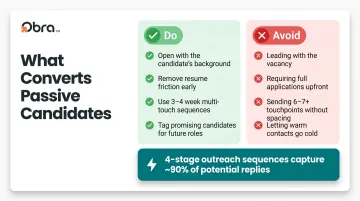
- Open with their background, not your vacancy. "We have a great opportunity" signals you didn't research them. Reference something specific you noticed — a project, a career trajectory, a skill set — before pitching anything.
- Remove friction early. Don't ask for a resume in the first message. Don't require a full application before a real conversation happens. Each extra step at the top of the funnel measurably cuts response rates.
- Build sequences that span 3–4 weeks. A 4-stage outreach sequence captures approximately 90% of all potential replies, while campaigns with 6–7 touchpoints can achieve response rates up to 450% higher than single-message outreach. Space touches 5–7 days apart and stop immediately if a candidate declines — over-sequencing damages your employer brand.
- Keep promising candidates tagged between searches. The person who wasn't ready six months ago is often the right hire today. Schedule low-pressure check-ins in your CRM or ATS so those relationships don't go cold.
Measure what actually matters:
- Response rate by message variation
- Conversion rate from first contact to phone screen
- Quality-of-hire for passive vs. active hires over time
Volume metrics are tempting to report on, but these three tell you whether your passive sourcing strategy is actually producing better hires.
Conclusion
AI recruitment tools don't replace recruiter judgment — they remove the manual work that prevents good judgment from scaling. The strategic calls still belong to you: how you define fit, how you personalize outreach around a candidate's career path, how you decide when to follow up and when to let a conversation breathe.
The teams that get the most from passive sourcing treat it as continuous pipeline work, not a one-time push when a role goes live. Keep your searches running, keep your outreach personal, and you'll have warm candidates ready when a seat opens — instead of scrambling to find them after the fact.
Frequently Asked Questions
How do recruiters find passive candidates?
Recruiters find passive candidates by proactively searching professional networks, skill-based databases, and sourcing platforms rather than waiting for inbound applications. AI tools accelerate this by scanning large candidate databases and matching profiles to specific competency criteria, even when those candidates aren't actively job searching.
What is the difference between passive and active candidates?
Active candidates apply to open roles; passive candidates are currently employed and not looking. Passive candidates make up the larger share of the talent market and require personalized outreach and relationship-building rather than standard application-based recruiting.
How do AI tools identify passive candidates who might be open to a move?
AI tools analyze behavioral signals (profile updates, industry content engagement, new connections, job tenure patterns) to flag candidates more likely to be receptive. Competency-based matching then surfaces those candidates by demonstrated skill fit, not just job titles or keyword matches.
What response rate should I expect when reaching out to passive candidates?
Overall recruiter outreach response rates have dropped to approximately 11% in 2026. However, highly personalized messages consistently outperform generic templates: personalized outreach generates up to 32% higher response rates, and multi-touch sequences (4+ stages) capture notably more replies than single-message sends.
Can AI recruitment tools work for non-tech roles like blue and gray collar positions?
Yes. Platforms like Obra Hire search across all industries, including healthcare, logistics, service, and operational roles, not just tech. The key is choosing a tool with broad database coverage and competency frameworks that reflect the actual skills those roles require.
How do I avoid wasting time on fake or AI-generated candidate profiles?
Prioritize platforms that include verified profile filtering. Gartner predicts 1 in 4 candidate profiles could be fake by 2028, making this a non-negotiable feature. Before investing outreach credits, look for signs of authenticity: consistent work history, real contact details, and cross-platform presence.