Introduction
Most recruiting teams already use an ATS. The problem is how they use it—as a standalone island, disconnected from the HRIS, job boards, background check tools, and communication platforms that surround it.
The result is predictable: recruiters manually copy candidate data between systems, chase status updates across five different tabs, and burn hours on administrative work that shouldn't exist. According to Aptitude Research, integration is the single greatest technology frustration for 60% of recruiters—and one in two would consider leaving their organization for better tools.
That frustration has a structural cause. The average company now runs more than 10 different recruiting tools, and without integration, every handoff between them creates friction.
This guide breaks down what ATS integrations are, which types matter most, and what it actually takes to build a connected recruiting stack that works.
TL;DR
- ATS integrations connect your applicant tracking system to the other tools in your hiring stack—HRIS, job boards, communication platforms, background check tools, and more—without manual data transfers.
- They eliminate manual data transfers, reduce hiring delays, and give every stakeholder a real-time view of the candidate pipeline.
- Top integrations to prioritize: HRIS/payroll, sourcing platforms, background checks, eSignature, and communication tools.
- A well-integrated ATS shortens time-to-hire, improves candidate experience, and reduces duplicate records and data errors.
- When evaluating ATS integrations, prioritize breadth of supported tools, ease of setup, and fit with your hiring workflow.
What Is an ATS Integration?
An ATS integration connects your applicant tracking system to another business tool—so data flows automatically between them without manual input. Instead of exporting a candidate's information from your ATS and re-entering it into your HRIS, an integration handles that transfer the moment a status changes.
Native vs. API-Based Integrations
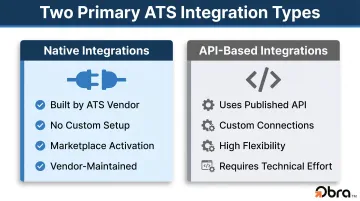
There are two primary types:
- Native integrations are built directly into the ATS platform by the vendor. They require no custom setup and are typically activated through a marketplace or settings panel. The vendor builds and maintains the connection.
- API-based integrations use the ATS platform's published API to build custom connections. They offer more flexibility for unique configurations but require more technical effort to set up and maintain.
Most enterprise ATS platforms offer both. Greenhouse, for example, provides hundreds of prebuilt marketplace integrations alongside five open APIs—giving teams the option to use ready-made connectors or build custom workflows programmatically.
Why the Integration Layer Matters
Whether you go native or API-based, the integration layer itself matters more than most teams realize. Modern hiring stacks commonly include 8–12 tools. HR.com's 2024 research found that 91% of organizations say a lack of integration impacts their business, with 33% saying it affects them "a lot." Only 13% of organizations run a single paid HR solution—everyone else is managing multiple systems that need to talk to each other.
Integrations and automation are related but distinct. Integrations connect systems so data syncs. Automation uses that connectivity to trigger actions—like sending an offer letter when a candidate reaches a specific stage. In practice, the two work together.
The Most Common Types of ATS Integrations
Not all ATS integrations serve the same function. Some move candidate data downstream into HR systems. Others pull candidates in from sourcing tools. Others accelerate specific actions like background checks or offer letters. Here's how each category works.
HRIS and Payroll Integrations
This is typically the highest-priority ATS integration. When a candidate is marked "hired," their profile data should flow directly into the HRIS—whether that's Workday, BambooHR, SAP SuccessFactors, or ADP—without manual re-entry. That single sync triggers payroll setup, benefits enrollment, and onboarding task assignment automatically.
Without it, teams run into compounding problems at the worst possible time:
- Duplicate records and mismatched compensation data across systems
- Incomplete employee profiles that delay first-day readiness
- Payroll errors—industry benchmarks place manual data entry error rates at 1–4% of fields, costing organizations 2–4% of total labor spend annually
Job Board and Candidate Sourcing Integrations
Inbound integrations with job boards like Indeed, LinkedIn, and ZipRecruiter automatically distribute job postings and funnel applications back into the ATS pipeline—no copy-paste required.
The more strategically valuable category is outbound sourcing integrations. Platforms like Obra Hire connect directly to your existing ATS workflow, letting recruiters search 800M+ verified candidate profiles and push contact data—including email addresses, phone numbers, LinkedIn profile URLs, and resumes—directly into their ATS pipeline. Instead of sourcing in one tool and tracking in another, outreach and pipeline management happen in one connected workflow.
Background Check and Compliance Integrations
Integrating a background check tool like Checkr or Sterling with your ATS lets you trigger a check automatically the moment a candidate's status changes to "offer accepted." This removes the manual step that typically creates lag between offer and start date.
That time savings adds up quickly. A Forrester Total Economic Impact study of Checkr found that ATS-integrated background checks cut the end-to-end screening process by five days per hire, generating $2.7M in incremental profit over three years for a composite organization running 8,000 checks annually.
This category also covers EEOC and DEI tracking tools that pull demographic data from the ATS to generate compliance reports automatically.
Communication and Collaboration Integrations
Integrations with Slack, Microsoft Teams, Google Calendar, and Outlook let hiring managers receive candidate update notifications, submit interview scorecards, and schedule interviews without ever opening the ATS.
Hiring managers live in communication tools, not in the ATS. Every time they have to context-switch to review a candidate or submit feedback, delays accumulate—surfacing that work where they already operate eliminates the bottleneck.
eSignature and Onboarding Integrations
Connecting your ATS to DocuSign or Adobe Sign lets you auto-generate offer letters using data already in the candidate profile the moment they reach "ready for offer" status—no manual document creation, no copying fields from one system to another.
Once an offer is signed, onboarding integrations with platforms like Rippling or ServiceNow automatically provision accounts, equipment requests, and first-day tasks—so everything is ready before the new hire walks in on day one.
Key Benefits of ATS Integrations
ATS integrations don't just save time. They change the quality of the hiring process for every person involved.
Eliminates Manual Data Entry and Reduces Errors
Every time a recruiter copies candidate data from one system to another, there's a chance of error—wrong salary in an offer letter, incorrect start date in payroll, mismatched job title in the HRIS. Integrations remove those manual handoffs by making data flow automatically from a single source of truth.
At scale, even a 1% error rate across thousands of records compounds fast — wrong start dates, mismatched titles, payroll discrepancies. The fix isn't better data entry — it's fewer data entry points.
Shortens Time-to-Hire
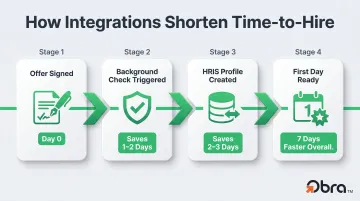
Integrations compress the timeline between hiring stages:
- Background checks start the moment offers are signed
- HRIS profiles are created before the first day
- Offer letters go out in minutes, not days
- Interview scheduling happens without back-and-forth email chains
Each of these compressions is small on its own. Together, they shorten time-to-hire in ways that protect against candidate drop-off—36% of candidates have declined a job offer due to a negative hiring experience, and SHRM found that 50% of candidates who accepted offers between May 2022 and May 2023 later reneged.
Improves Candidate Experience
Speed and communication quality are what candidates notice. A candidate who waits two weeks for an offer letter after a verbal agreement is actively interviewing elsewhere. Integrations keep the process moving and candidates engaged at each stage—faster responses, fewer administrative gaps, and fewer moments where the process simply goes quiet.
Boosts Recruiter and Hiring Manager Productivity
Recruiters freed from data entry and tool-switching can spend that time on work that directly drives results: sourcing passive candidates, strengthening relationships, and closing competitive offers.
Hiring managers benefit from feedback and notifications surfaced inside the tools they already use, which cuts the review delays that stretch hiring timelines.
Enables Better Reporting and Compliance
When data flows consistently across integrated systems, reporting becomes reliable. Recruiting metrics can be generated from a single consistent data set — rather than reconciling exports from five different tools that each tracked things slightly differently.
That means accurate, audit-ready reporting across:
- Time-to-fill and source effectiveness
- Offer acceptance and decline rates
- EEOC compliance data
- Pipeline velocity by role or department
Best Practices for Implementing ATS Integrations
Most ATS integration failures share a common cause: teams connect tools before understanding the workflow those tools are supposed to fix. A few deliberate steps upfront prevent most of the problems that surface later.
Map Your Hiring Workflow Before Connecting Anything
Document every step in your current hiring process—from job requisition to first day—and identify where data is manually transferred between tools. Those handoffs are your integration priorities. Without this map, teams often integrate the tools that are easiest to connect rather than the ones creating the most friction.
Prioritize by Bottleneck, Not by Popularity
The right first integration depends on where your process is slowest:
- Slow offer-to-start timelines → prioritize HRIS and eSignature integrations
- High time-in-offer-stage → prioritize background check integrations
- Low candidate pipeline volume → prioritize sourcing platform integrations
- Delayed hiring manager feedback → prioritize communication tool integrations
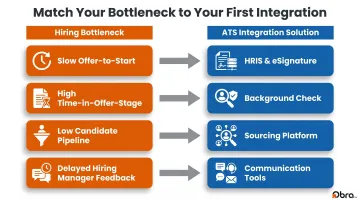
Once you've identified your highest-friction point, start there — not everywhere. Phased implementation makes it easier to isolate problems and confirm each integration is working before adding the next one.
Establish Clear Data Ownership Rules
Before connecting any systems, define which platform owns each data field. Key decisions to make upfront:
- Source of truth: Which system holds the authoritative version of each field (name, salary, status)?
- Write vs. read access: Which system can update a field, and which can only read it?
- Conflict resolution: What happens when both systems carry different values for the same record?
If both the ATS and HRIS can write to a candidate's salary field, conflicts will happen. Settling these questions before a single API connection is made saves significant cleanup time later.
Test and Audit Regularly
Test every integration against real candidate scenarios before going live — not just synthetic test records. After launch, schedule periodic audits to catch:
- Data mismatches between connected systems
- Broken API connections after platform updates
- Outdated field mappings that no longer reflect current workflows
Integrations degrade as platforms release updates. Treat maintenance as an ongoing process, not a one-time task.
How to Evaluate ATS Integration Capabilities
Not all ATS platforms offer the same integration depth. Some provide a handful of native connectors; others offer hundreds of prebuilt integrations plus open API access. Integration capability should be a primary evaluation criterion, not a footnote.
What to Look for in an ATS Integration Ecosystem
When evaluating an ATS or a complementary hiring tool, check for:
- Number of native integrations available out of the box
- Support for your specific systems—Workday, Greenhouse, iCIMS, Lever, SAP SuccessFactors, and others
- API access for custom connections when prebuilt options don't cover your stack
- Setup complexity—whether integrations can be activated without IT involvement
- Data sync depth—whether key fields like compensation, job title, and custom data map correctly, not just basic name and email
For context on ecosystem scale: iCIMS offers 800+ prebuilt integrations with over 10,000 total activated integrations. Greenhouse provides hundreds of prebuilt connectors across 15+ categories alongside five distinct APIs.
For outbound sourcing specifically, look for platforms that layer onto your existing ATS stack rather than replace it. Obra Hire, for example, connects with 85+ ATS and HRIS platforms: Workday, Greenhouse, iCIMS, Lever, SAP SuccessFactors, SmartRecruiters, and Oracle Recruiting Cloud, among others.
That means recruiting teams can add outbound sourcing capabilities without restructuring current workflows. When a recruiter identifies a candidate in Obra Hire and unlocks their contact details, that profile data pushes directly into the connected ATS pipeline.
Frequently Asked Questions
How does an applicant tracking system (ATS) work?
An ATS collects job applications, parses resumes into structured candidate profiles, and lets recruiters track candidates through defined pipeline stages. It handles automated communications, interview scheduling, and recruiter-hiring manager collaboration across the entire hiring process, from job posting through offer.
What is an ATS integration?
An ATS integration is a connection between an ATS and another software tool—such as an HRIS, job board, or background check platform—that allows data to sync automatically between them. This eliminates manual transfers and keeps hiring workflows moving without requiring recruiters to re-enter information across multiple systems.
What systems can integrate with an ATS?
The main categories include HRIS and payroll systems (Workday, BambooHR, ADP), job boards (Indeed, LinkedIn, ZipRecruiter), outbound sourcing platforms, background check tools (Checkr, Sterling), eSignature apps (DocuSign, Adobe Sign), communication platforms (Slack, Microsoft Teams), calendar tools, and onboarding or ITSM systems like Rippling or ServiceNow.
What is the difference between native and API-based ATS integrations?
Native integrations are built and maintained by the ATS vendor—they're typically activated through a marketplace or settings panel with no custom setup required. API-based integrations use the platform's published API to build custom connections, offering more flexibility but requiring more technical effort to implement and maintain over time.
Can outbound sourcing tools integrate with an ATS?
Yes. Outbound sourcing platforms are specifically designed to connect with existing ATS workflows. When a recruiter identifies and unlocks a candidate in Obra Hire, the platform pushes contact details—email address, phone number, LinkedIn profile URL, and resume—directly into the connected ATS, keeping sourcing activity and candidate tracking in one place.
What are the most common ATS integration challenges?
The most frequent issues are:
- Data field mismatches between systems
- Unclear data ownership rules that cause conflicting records
- Integrations breaking after platform updates
- Complexity of syncing across more than two systems at once
All are addressable with upfront workflow mapping, clear source-of-truth rules, and scheduled integration audits.